Slicing
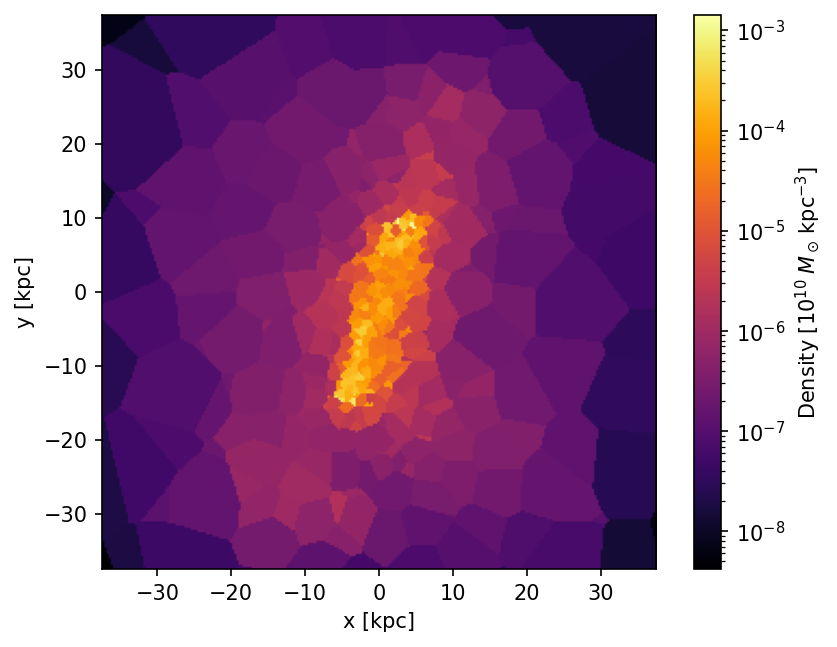
A slice extracts a 2D plane of interpolated field values at a constant depth through the Voronoi mesh. Unlike a projection (which integrates along the line of sight), a slice returns the field value of the cell at each pixel.
import vortrace as vt

BoxSize = 100.0
pc = vt.ProjectionCloud(
    pos, rho, vol=vol,
    boundbox=[0, BoxSize, 0, BoxSize, 0, BoxSize],
)

# Slice: 256x256 pixels at the box midplane
L = 75.0
extent = [BoxSize / 2 - L / 2, BoxSize / 2 + L / 2,
          BoxSize / 2 - L / 2, BoxSize / 2 + L / 2]
data = pc.slice(extent, 256, depth=BoxSize / 2)
# data.shape is (256, 256) for a single field
The low-level Cvortrace.Slice class is also available for direct use.
#include <vortrace/vortrace.hpp>

PointCloud cloud;
cloud.loadPoints(pos, npart, fields, npart, 1, subbox);
cloud.buildTree();

std::array<size_t, 2> npix = {256, 256};
Float L = 75.0, BoxSize = 100.0;
std::array<Float, 4> extent = {
    BoxSize / 2 - L / 2, BoxSize / 2 + L / 2,
    BoxSize / 2 - L / 2, BoxSize / 2 + L / 2};
Float depth = BoxSize / 2;

Slice slice(npix, extent, depth);
slice.makeSlice(cloud);

const auto& data = slice.getSliceData();
// data[iy * npix_x * nfields + ix * nfields + f]
Saving a slice to file
The C++ Slice class provides a built-in method to save the slice data:
slice.saveSlice("slice_output.dat");
For Python, save the result using NumPy or the vortrace.io module.
See also
Grid Projection for projections that integrate along the line of sight.