Traced Projections
Sometimes you need to inspect the full trace along a ray – which cells it crosses, the path length through each cell, and the field value in each cell. This is useful for debugging, visualization, and understanding the structure of the mesh along a line of sight.
traced_projection works for both single rays and batches.
Tracing a single ray
import numpy as np
import vortrace as vt

pc = vt.ProjectionCloud(
    pos, rho, vol=vol,
    boundbox=[0, BoxSize, 0, BoxSize, 0, BoxSize],
)

pt_start = np.array([BoxSize / 2 + 3, BoxSize / 2 + 10.5, 0])
pt_end   = np.array([BoxSize / 2 + 3, BoxSize / 2 + 10.5, BoxSize])

dens, cell_ids, s_vals, ds_vals = pc.traced_projection(pt_start, pt_end)

# dens      -- integrated column density (scalar for single field)
# cell_ids  -- original particle index for each segment
# s_vals    -- midpoint path parameter for each segment
# ds_vals   -- path length through each cell
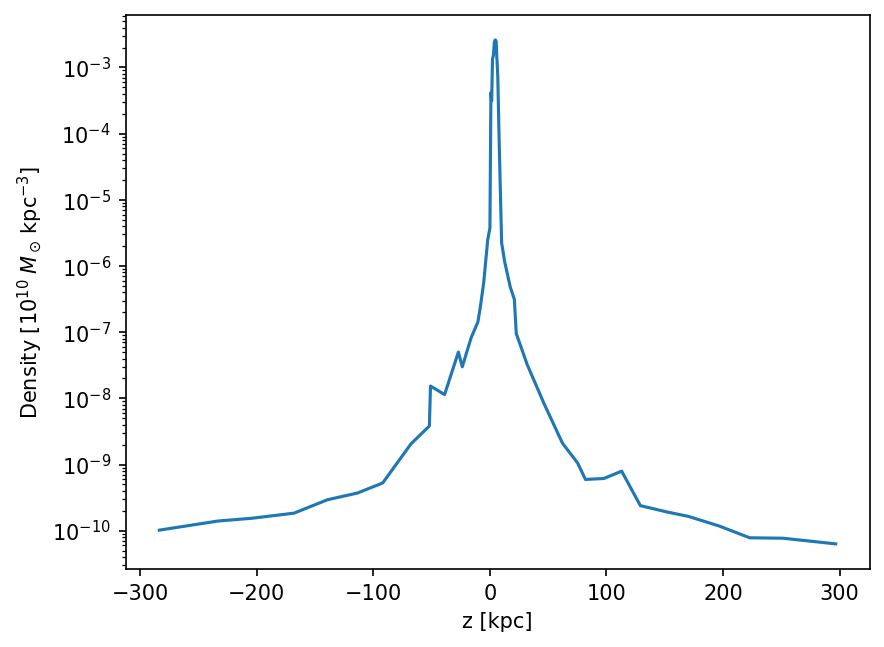
Plot the density profile along the ray:
fig, ax = vt.plot.plot_ray(s_vals - BoxSize / 2, rho[cell_ids])
ax.set_xlabel("z [kpc]")
ax.set_ylabel("Density")
#include <vortrace/vortrace.hpp>
#include <vortrace/ray.hpp>

Point start = {53.0, 60.5, 0.0};
Point end   = {53.0, 60.5, 100.0};

Ray ray(start, end);
ray.walk(cloud);

// Access the ordered list of segments
const auto& segments = ray.get_segments();
for (const auto& seg : segments) {
    size_t cell  = seg.cell_id;
    double enter = seg.s_enter;
    double exit  = seg.s_exit;
    double ds    = seg.ds();
    double field_val = cloud.get_field(cell, 0);
    // ... process each segment ...
}

// Or integrate directly
ray.integrate(cloud, ReductionMode::Sum);
double column = ray.get_col()[0];  // integrated value for field 0
Segment data
Each segment records:
cell_id – the particle index of the Voronoi cell crossed
s_enter – distance along the ray where it enters the cell
s_exit – distance along the ray where it exits the cell
ds – path length through the cell (
s_exit - s_enter)
The segments are returned in order from start to end of the ray.
Batch segment queries
Pass an (N, 3) array of start and end points to get per-segment data
for many rays at once. The rays are traced in parallel using OpenMP.
# Define N rays
pts_start = np.zeros((N, 3))
pts_end = np.zeros((N, 3))
pts_start[:, :2] = ray_positions  # vary x, y
pts_start[:, 2] = 0.0
pts_end[:, :2] = ray_positions
pts_end[:, 2] = BoxSize

# Returns lists of arrays (one per ray)
values, cell_ids_list, s_vals_list, ds_vals_list = pc.traced_projection(
    pts_start, pts_end
)

# Access segments for ray i
for i in range(N):
    ray_cells = cell_ids_list[i]
    ray_ds    = ds_vals_list[i]
    ray_smid  = s_vals_list[i]
For performance-critical code, use flatten=True to get flat
flat arrays with an offset index:
values, cell_ids, s_vals, ds_vals, offsets = pc.traced_projection(
    pts_start, pts_end, flatten=True
)

# Ray i's segments are at offsets[i]:offsets[i+1]
for i in range(N):
    ray_cells = cell_ids[offsets[i]:offsets[i+1]]
    ray_ds    = ds_vals[offsets[i]:offsets[i+1]]
See also
Algorithm for how the ray-walking algorithm finds these segments.