Arbitrary Ray Projections
Instead of a regular grid, you can pass your own arrays of ray start and end points. This is useful for irregular geometries like HEALPix sky maps or any custom ray configuration.
Batch projection
import numpy as np
import vortrace as vt

pc = vt.ProjectionCloud(
    pos, rho, vol=vol,
    boundbox=[0, BoxSize, 0, BoxSize, 0, BoxSize],
)

# Define N custom rays
pts_start = np.array([[50, 50, 0], [50, 50, 0], [50, 50, 0]], dtype=float)
pts_end   = np.array([[50, 50, 100], [60, 50, 100], [50, 60, 100]], dtype=float)

result = pc.projection(pts_start, pts_end)
# result.shape == (3,) for a single field
#include <vortrace/vortrace.hpp>

// rays_start, rays_end: flat arrays [x0,y0,z0, x1,y1,z1, ...]
size_t nrays = 3;
Float rays_start[] = {50,50,0, 50,50,0, 50,50,0};
Float rays_end[]   = {50,50,100, 60,50,100, 50,60,100};

Projection proj(rays_start, rays_end, nrays);
proj.makeProjection(cloud, ReductionMode::Sum);

const auto& data = proj.getProjectionData();
// data[i] = integrated column density for ray i
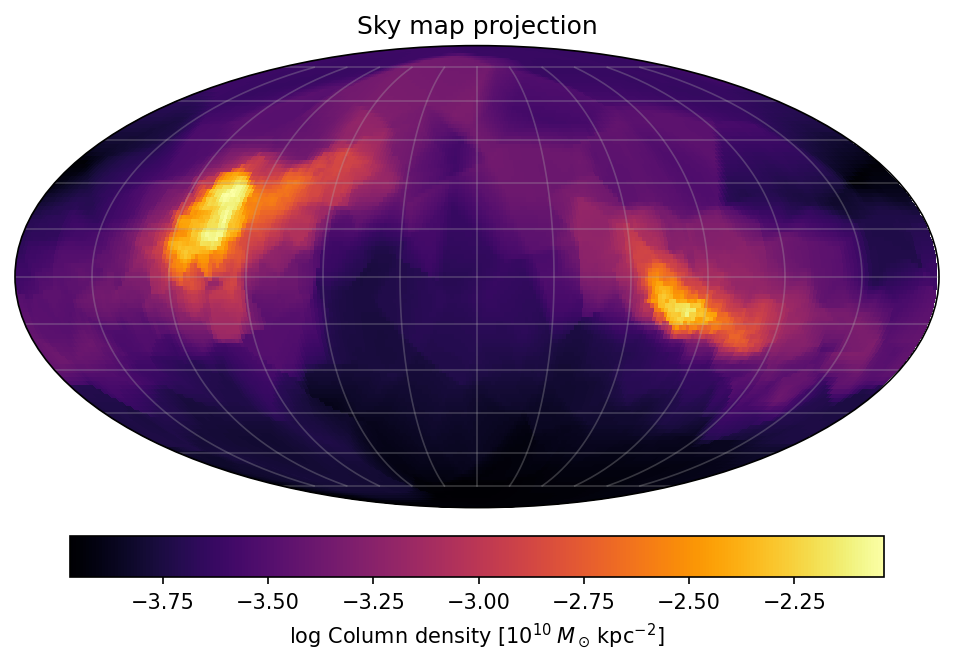
HEALPix sky map example
import healpy as hp

nside = 64
npix = hp.nside2npix(nside)

unitv = np.array(hp.pix2vec(nside=nside, ipix=np.arange(npix))).T
pts_end = 100 * unitv + BoxSize / 2
pts_start = np.full_like(pts_end, BoxSize / 2)

dens = pc.projection(pts_start, pts_end)

hp.mollview(dens)
The C++ library handles any set of rays. Generate HEALPix directions
using a HEALPix C++ library (e.g. healpix_cxx) and pass the
start/end arrays to Projection.
Note
All reduction modes (Sum, Max, Min, VolumeRender) work
with arbitrary rays, just as with grid projections.
Tip
If you need per-segment data (cell IDs, path lengths) in addition to the
reduced values, use traced_projection()
instead of projection. See Traced Projections for details.